Tuesday, 22 June 2021

Grade 3 - EVS - 22nd JUNE 2021- VIRTUAL ONLINE CLASS DETAILS - CH- 5(PLANT WORLD)

          SUBJECT - EVS

    16/06/2021 (WEDNESDAY)
    VIRTUAL ONLINE CLASS DETAILS


    TOPIC TAUGHT (TODAY)

    CH- 5 (Plant World) 

  • Diagnostic Test on done.
  • Kick Start for done.
Complete the KWL Chart in NB 👇


 HOMEWORK
    
    Visit your society garden or explore through the internet and see the types of trees, bushes, herbs, plants (big and small), Observe carefully.


    21/06/2021 (MONDAY)
    VIRTUAL ONLINE CLASS DETAILS


    TOPIC TAUGHT (TODAY)

1. Types of Plants- Trees, Shrubs, Herbs & Climbers with examples.
2. Discussed the differences between Trees/Shrubs/Herbs/Climbers.
3. Explained the parts of the plant and shoot system of the plant with the help of video.

HOMEWORK

Read page 35 from TB.
Observe different types of plants around your home or society.

    
22/06/2021 (TUESDAY)
    VIRTUAL ONLINE CLASS DETAILS

    TOPIC TAUGHT (TODAY)


  • Recapitulation of the previous class
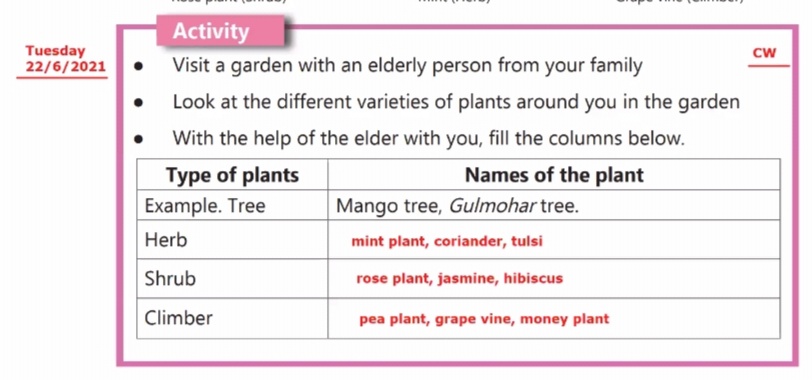
  • The activity of pg- 36 ( done in class)👇
  • Parts of the plant
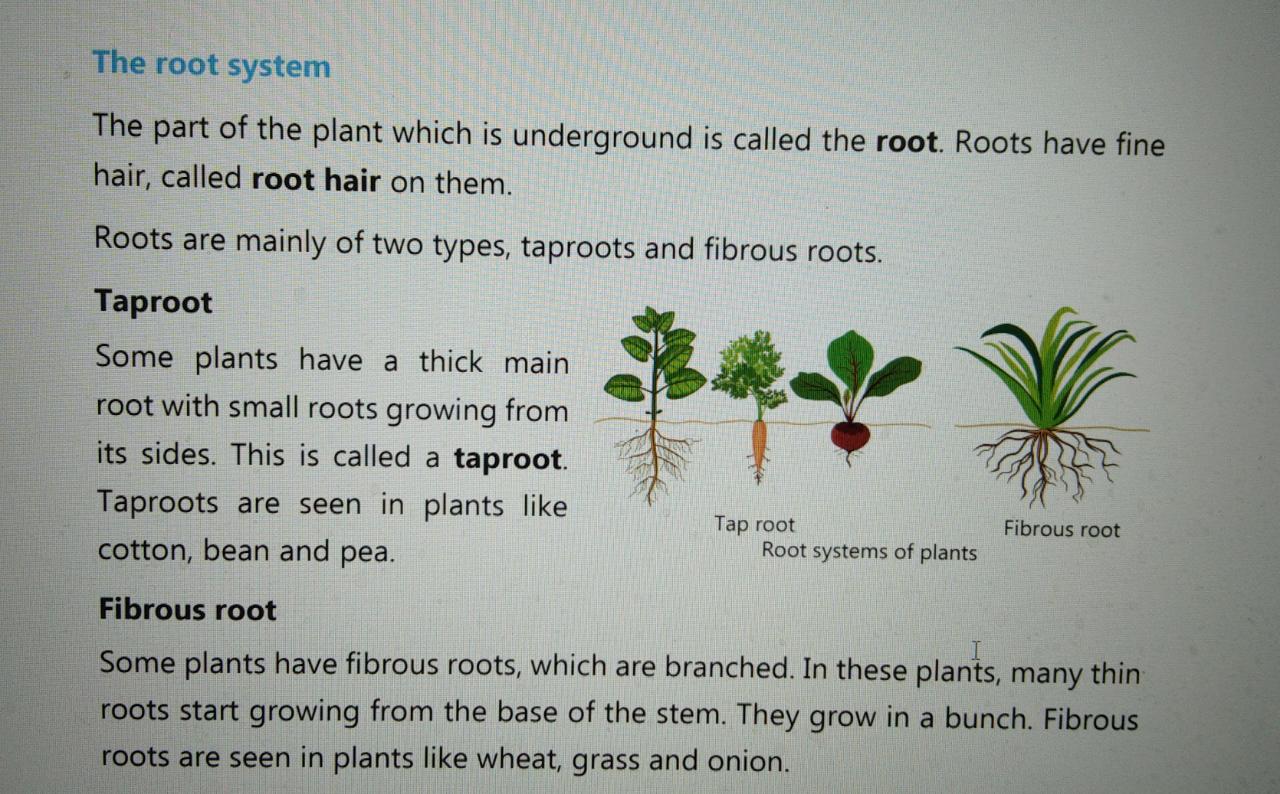
  • The root system (tap root, fibrous roots, and aerial roots)
  • Functions of the roots
  • A video shown and explained on taproots and fibrous roots


    HOMEWORK

Read page 36 and 37 from TB.


23/06/2021 (WEDNESDAY)
    VIRTUAL ONLINE CLASS DETAILS

    TOPIC TAUGHT (TODAY) 

  • Recapitulation of the previous class
  • Shoot system ( explained with real plants )
  • The video showed and explained
👇


 HOMEWORK

Complete the following  👇 in your TB


28/06/2021 (MONDAY)
    VIRTUAL ONLINE CLASS DETAILS

    TOPIC TAUGHT (TODAY) 
  • Explanation of Structure of Leaf with the help of Video.
  • Explained parts of the leaf and their functions.
  • Conducted Leaf tracing activity and label its parts.
Reference image of Leaf tracing  👇


Click the following to get the link for reference 👇


    HOMEWORK

Revise the topic -Structure of Leaf and learn the parts.


29/06/2021 (TUESDAY)
    VIRTUAL ONLINE CLASS DETAILS

    TOPIC TAUGHT (TODAY) 
  • Explanation of Structure of Leaf (Recapitulation)
  • Uses of leaves (Explanation done with PPT)
  • Flower, fruit, and seed (Explanation done with PPT)
  • Scrapbook activity explained on germination of seed.

    HOMEWORK 

1) Complete the following in the TB itself.👇


2) Complete the following table in the Notebook:


Note-

Scrapbook Activity

Materials needed: 👉Plastic container, soil, seeds (preferably moong, rajma)

Procedure 👇

Keep two potted plants; one inside the cupboard or in a dark corner and one near the window where enough sunlight is available. Water both plants daily.

Steps for the activity 👇

 1. First make a hole at the bottom of the plastic container. (take the help of parents for doing this) 

 2. Fill the container with soil/moist cotton. 

 3. Put some seeds into the soil.

4. Cover it with a thin layer of soil.

 5. Place this entire setup in a place where there is enough sunlight. 

 6. Water it daily. (Caution: Do not pour excess water as the seeds may die and you will not get the desired result.) 

 7. After 3 to 4 days, you will observe a tiny sprout coming out of the seed. 

 8. Observe the sprout growing every day. 
  • Write your observations on your plants(both the pots).


Note- Submit the activity on 10th July on mail. ( If possible along with the pictures of your plants.)

   
30/06/2021 (WEDNESDAY)
    VIRTUAL ONLINE CLASS DETAILS

    TOPIC TAUGHT (TODAY) 
  • Explanation of flower, fruit, and seed(Recapitulation)
  • Functions of flowers
  • Functions of fruits
  • Germination of seed
  • Hybrid plants
  • Uses of plants (Explained with the help of a video)
  • A video was shown on how a flower turns into a fruit and explained
  • Important points marked in TB
  • Cleared doubts on the scrapbook activity
 HOMEWORK 
Learn the following chapters for the class test on 8/7/21(Thursday)
  • Ch- 1(Food and Health) 
  • Ch- 2 (Soil)


Monday, 21 June 2021

Singular and Plural

Singular and Plural noun has been explained in the class and videos shown.


Date: 22/06/21 Grade 3 Sub: Computer Topic: Using OpenOffice Writer


Date: 22/06/21 

Grade 3

Sub: Computer 

Topic:  Using OpenOffice Writer

Taught: 
Pg 25,26 were explained :
1)Editing a document: Steps to select text


Home work:
1) Write down these 3 sentences in the same format as shown in the box given below.  ( I have uploaded pg no 26 and 27 of Computer textbook for reference)


Write these three sentences in the same format as given in the question and click pictures and send it to me through mail on : aakanksha.shrivashtava@podar.org

2) Please practice to type a sentence and select it 


Note: All the students who were not able to get the "Storage Devices" worksheet  and "Hardware and Software devices "worksheet on "Between Us" , I have uploaded the Image of that worksheet . I hope now the students will not face any problem.


Please upload the worksheets on between us
Please E-mail the work of Notebook, Text Book 
Please send your work as soon as possible as the Submission Date for chapter 1 is already over.


-------------------------------------------------------------------------------------------------------------

Date: 28/6/21
Monday

Taught:

1)Steps to delete selected text (Pg 27)

For reference👇


2)Steps to Cut, Copy, Paste Text (Pg 28)
for reference👇


Home Work:

1) Type the following in open office Writer:


2) Perform the following task:

Click the pictures of your work (monitor) , send it on my mail id


----------------------------------------------------------------------------------------------------------------------------


Grade 3      
Sub: Computer         
Topic:  Using OpenOffice Writer

Date: 19/7/21
Monday

Taught: 
1)Formatting a document (Bold, Italic and Underline):
Making text bold, italic or underlining it is used to make selected text stand out.

For reference👇


Home work: Do the practical given in the section: "Learning by doing" given on page 29. Click the image of your work (work should be done on open office writer ) and send the images on my mail.


 ---------------------------------------------------------------------------------------------------------------------------
Note: In case of any  doubt , contact me on 6354172432
Important: Send all the NB, TB work through mail on : aakanksha.shrivashtava@podar.org

Upload the picture of worksheets on between us

Grade 3 Periodic test exam Time table (2021-2022)


Date: 21/06/21 Grade 3B Sub: Computer Topic: Using OpenOffice Writer


Date: 21/06/21 

Grade 3B

Sub: Computer 

Topic:  Using OpenOffice Writer

Taught: 
Pg 25,26 were explained :
1)Editing a document: Steps to select text


Home work:
1) Write down these 3 sentences in the same format as shown in the box given below.  ( I have uploaded pg no 26 and 27 of Computer textbook for reference)


Write these three sentences in the same format as given in the question and click pictures and send it to me through mail on : aakanksha.shrivashtava@podar.org

2) Please practice to type a sentence and select it 


Note: All the students who were not able to get the "Storage Devices" worksheet  and "Hardware and Software devices "worksheet on "Between Us" , I have uploaded the Image of that worksheet . I hope now the students will not face any problem.


Please upload the worksheets on between us
Please E-mail the work of Notebook, Text Book 
Please send your work as soon as possible as the Submission Date for chapter 1 is already over.


 ---------------------------------------------------------------------------------------------------------------------------
Note: In case of any  doubt , contact me on 6354172432
Send all the NB, TB work through mail on : aakanksha.shrivashtava@podar.org

Time table grade 3E